안드로이드
[JAVA][Android] Bottom Sheet에서 Activity로 데이터 보내기
leui
2022. 5. 22. 15:19
Activity에서 열은 Bottom sheet의 데이터를 Activity로 보내야 할 때가 있다. Fragment의 인터페이스를 이용하여 데이터를 보내보자
Bottom Sheet 구현은 이전 포스트에 올려두었다.
[JAVA][Android] Bottom sheet dialog
결과 bottom sheet을 간단하게 구현해보고 bundle에 activity에 데이터를 담아 dialog로 데이터를 보내보겠다. 결과 Bottom Sheet Fragment (BottomSheetFragment로 이름 지었다) fragment_bottom_sheet.xml <?xm..
leui.tistory.com
- 결과창
동영상 서비스가 종료되어 해당 콘텐츠를 재생할 수 없습니다.
- activity_main.xml
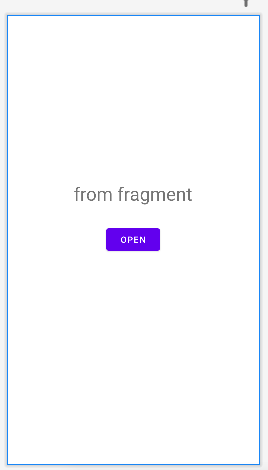
간단하게 Bottom sheet으로 부터 받은 데이터를 띄어줄 TextView와 Bottom Sheet을 여는 버튼만 두었다.
<?xml version="1.0" encoding="utf-8"?>
<androidx.constraintlayout.widget.ConstraintLayout xmlns:android="http://schemas.android.com/apk/res/android"
    xmlns:app="http://schemas.android.com/apk/res-auto"
    xmlns:tools="http://schemas.android.com/tools"
    android:layout_width="match_parent"
    android:layout_height="match_parent"
    tools:context=".MainActivity">

    <TextView
        android:id="@+id/text_main"
        android:layout_width="wrap_content"
        android:layout_height="wrap_content"
        android:textSize="30dp"
        android:text="from fragment"
        android:layout_marginBottom="150dp"
        app:layout_constraintBottom_toBottomOf="parent"
        app:layout_constraintLeft_toLeftOf="parent"
        app:layout_constraintRight_toRightOf="parent"
        app:layout_constraintTop_toTopOf="parent"/>

    <Button
        android:id="@+id/btn_open"
        android:layout_width="wrap_content"
        android:layout_height="wrap_content"
        android:text="open"
        app:layout_constraintBottom_toBottomOf="parent"
        app:layout_constraintLeft_toLeftOf="parent"
        app:layout_constraintRight_toRightOf="parent"
        app:layout_constraintTop_toTopOf="parent"/>

</androidx.constraintlayout.widget.ConstraintLayout>
- fragment_bottom_sheet.xml
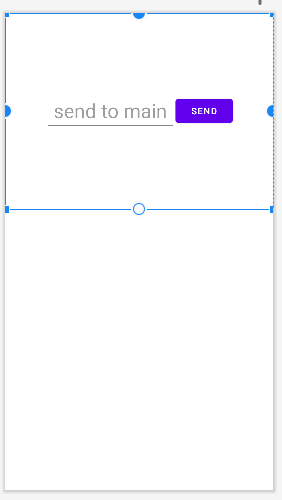
bottom sheet은 MainActivity로 보낼 데이터인 EditText와 fragment를 종료하고 main에 데이터를 보낼 버튼을 두었다.
<?xml version="1.0" encoding="utf-8"?>
<androidx.constraintlayout.widget.ConstraintLayout xmlns:android="http://schemas.android.com/apk/res/android"
    xmlns:tools="http://schemas.android.com/tools"
    android:layout_width="match_parent"
    android:layout_height="match_parent"
    xmlns:app="http://schemas.android.com/apk/res-auto"
    tools:context=".BottomSheetFragment">


    <LinearLayout
        android:layout_width="match_parent"
        android:layout_height="300dp"
        app:layout_constraintEnd_toEndOf="parent"
        app:layout_constraintStart_toStartOf="parent"
        app:layout_constraintTop_toTopOf="parent"
        android:orientation="horizontal"
        android:gravity="center">

        <EditText
            android:id="@+id/edit_frag"
            android:layout_width="200dp"
            android:layout_height="wrap_content"
            android:textSize="30dp"
            android:hint="send to main"
            android:gravity="center" />

        <Button
            android:id="@+id/btn_send"
            android:layout_width="wrap_content"
            android:layout_height="wrap_content"
            android:text="send"/>

    </LinearLayout>

</androidx.constraintlayout.widget.ConstraintLayout>
- BottomSheetFragment.java
public class BottomSheetFragment extends BottomSheetDialogFragment {

    // 1. interface 생성
    public interface InputListener {
        void sendInput(String output); //데이터 담을 함수
    }

    public InputListener mInputListener; // 2. 맴버 변수 생성

    @Override
    public View onCreateView(LayoutInflater inflater, ViewGroup container,
                             Bundle savedInstanceState) {
          return inflater.inflate(R.layout.fragment_bottom_sheet, container, false);
    }

    @Override
    public void onViewCreated(@NonNull View view, @Nullable Bundle savedInstanceState) {
        super.onViewCreated(view, savedInstanceState);

        Button buttonSend = view.findViewById(R.id.btn_send);
        EditText editInput = view.findViewById(R.id.edit_frag);

        buttonSend.setOnClickListener(new View.OnClickListener() {
            @Override
            public void onClick(View view) {
                // 4. 데이터 담기
                mInputListener.sendInput(editInput.getText().toString());
                dismiss();
            }
        });
    }

    // 3. onAttach 맴버변수 초기화
    // onAttach는 fragment가 생성될 때 가장 먼저 실행
    @Override
    public void onAttach(@NonNull Context context) {
        super.onAttach(context);
        try {
            mInputListener = (InputListener) getActivity();
        } catch (ClassCastException e) {
            Log.e("ClassCastException", e.getMessage());
        }
    }
}
- MainActivity.java
public class MainActivity extends AppCompatActivity
        implements BottomSheetFragment.InputListener{ // BottomSheetFragment의 interface 구현

    BottomSheetFragment bottomSheetFragment;
    TextView outputText;

    @Override
    protected void onCreate(Bundle savedInstanceState) {
        super.onCreate(savedInstanceState);
        setContentView(R.layout.activity_main);

        outputText = findViewById(R.id.text_main);

        findViewById(R.id.btn_open).setOnClickListener(new View.OnClickListener() {
            @Override
            public void onClick(View view) {
                bottomSheetFragment = new BottomSheetFragment();
                bottomSheetFragment.show(getSupportFragmentManager(), bottomSheetFragment.getTag());
            }
        });
    }

    // BottomSheetFragment InputListener 인터페이스 함수
    @Override
    public void sendInput(String output) {
        // output은 fragment bottom sheet의 데이터
        outputText.setText(output);
    }
}